



Fabric Forward: What We Learned at FabCon 2026
This article recaps key takeaways from the 2026 Microsoft Fabric Community Conference, highlighting the shift from experimentation to real-world execution and how Fabric is evolving into a unified, AI-driven data platform powering production-grade analytics and innovation.

This week, the Bowdark team headed down to Atlanta to attend the third annual Microsoft Fabric Community Conference. As is often the case with these kinds of conferences, it was three jam-packed days of learning with plenty of lively conversation about the future of data, analytics and, of course, AI.
As the community continues to grow, the energy around what Fabric could become and how it might reshape the data landscape has only intensified. This year, it was particularly interesting to see how much the conversation shifted from exploration to execution. For context, check out our recap from last year where the focus was more on enterprise-level hardening. This time around, we talked to a number of customers that have moved well beyond the POC phase to running stable, production-grade workloads on the platform with OneLake increasingly emerging as the trusted foundation for their data estate.

These early successes have inspired a tremendous amount of confidence in the platform. Meanwhile, as the core capabilities continue to prove themselves in production, teams are gaining the time and space to focus on what comes next, exploring more advanced areas like Real-Time Intelligence, Data Science, and Fabric IQ to deepen insights and support more timely, informed decision-making.
In this recap, we’ll take a look at how the Fabric community is evolving and highlight some of the most notable announcements that stood out from this year’s conference.
State of the Community
If the size of FABCON 2026 is any indication of enthusiasm about the platform, then it's pretty safe to say that the state of the Fabric community is very strong. While one might argue that Fabric was a little late to the game compared to other leading competitors such as Snowflake, Databricks, or semi-equivalent competitors from hyperscalers such as AWS and GCP, Microsoft has done an excellent job driving adoption with the platform.
By the Numbers
In terms of sheer growth, Fabric's numbers continue to be off the charts:
- There were well over 8,000 community members gathered in Atlanta for this year's conference.
- Over 31K customers are now running Microsoft Fabric including over 90% of the Fortune 500. This is up from approximately 19K customers last year.
- The adoption rates are even more staggering when you consider that there are now over 425K customers running Power BI and over 35M users worldwide.
- Microsoft is predicting that over 1B agents will enter the workforce by 2028. Many of these agents will be grounded in Fabric IQ.
- Fabric is the only data platform on the market that's a leader in these key Gartner Magic Quadrants: Analytics and BI Platforms, Data Integration Tools, Data Science and Machine Learning Platforms, and AI Application Development Platforms.
By pretty much any measure imaginable, Fabric remains the fastest growing analytics platform in the world. This is perhaps best evidenced by the staggering amount of data being brought into OneLake year-over-year (see Figure 1 below).

Figure 1: OneLake Adoption Numbers as of March, 2026
Announcements
This year, there were a ton of big announcements crammed into an opening keynote that ran a little over 2 hours. Indeed, there were so many announcements that we could never do them proper justice here in this space. Fortunately, Microsoft did a nice job of recapping everything over in their community blog and Arun Ulag, President of Azure Data and Microsoft, also provided an excellent conference recap here.
With that as a backdrop, let’s shift gears and take a closer look at some of the more notable announcements that stood out to us.
Introduction of Database Hub
Microsoft introduced their new Database Hub as “an agentic control plane for your entire database estate,” and it seems to build on a path they first started down with the introduction of Fabric Databases in 2024. What began as a way to bring managed, cloud-native operational databases like Azure SQL and Cosmos DB closer to the Fabric experience has now expanded into something much broader. With Database Hub, customers can now extend that reach beyond those managed services to span both Microsoft and 3rd-party database platforms, including those that live in your on-premises landscape.
Instead of treating database workloads as something separate from your analytics platform, Database Hub introduces a unified place to create, manage, and work with transactional data alongside your lakehouses, warehouses, and semantic models. It’s a continuation of Microsoft’s push to close the gap between operational and analytical data, making it easier to work across your entire data estate without constantly moving data between systems.
As you can see in Figure 2 below, the Database Hub is intended to act as a single pane of glass for managing your entire database estate, bringing developer-friendly operational workloads into one unified experience while still plugging directly into Fabric’s broader analytics and AI capabilities.

Figure 2: A Preview Image of the New Database Hub
What makes this notable is how it starts to blur the line between application data and analytics. With the Database Hub, teams can build and manage operational data stores that are immediately available for reporting, real-time analytics, and AI without complex data movement or integration layers. It’s another step toward Fabric’s broader vision of a single, end-to-end data platform where data doesn’t have to be constantly shuffled between systems to be useful.
Platform-Level Improvements
Not every meaningful update comes with a flashy headline. This year’s conference also brought a wave of platform-level improvements focused on the fundamentals. These are the kinds of changes that make Fabric run better, scale more smoothly, and feel more predictable in real-world use. Across data warehouses, lakehouses, OneLake security, Spark performance, and now expanded end-to-end CI/CD pipeline support, Microsoft continues to tighten the bolts on the core platform.
Custom SQL Pools in Fabric Data Warehouse
The introduction of Custom SQL Pools in Fabric Data Warehouse is a welcome addition for customers that are used to having more control over how compute resources are allocated in data warehouses hosted in Azure Synapse Analytics (the PaaS analog to Fabric Data Warehouses).
Up to now, Fabric has done a pretty good job of abstracting away the infrastructure. While this approach made it easy to get started, it's also meant that we don’t have a ton of control when workloads start to scale or compete with each other. Custom SQL Pools change that by giving us the ability to carve out and dedicate compute to specific workloads.
As you can see in Figure 3 below, this capability enables us to isolate workloads, prioritize what matters most, and avoid the “noisy neighbor” problem where one team’s query slows everyone else down. It’s a nice step toward balancing Fabric’s simplicity with the kind of control you’d expect from a more traditional enterprise data warehouse, especially as you start running more serious, production-grade workloads on the platform.

Figure 3: Working with Custom SQL Pools in Fabric Data Warehouse
Materialized Lake Views Generally Available
One of the more practical updates coming out of the conference is the general availability of Materialized Lake Views. While this capability has been in public preview for some time, its move to GA signals that it’s ready for prime time and opens the door for broader adoption across enterprise workloads.
Materialized Lake Views simplify a pattern that many teams have been building manually, especially when implementing medallion architectures. Instead of stitching together pipelines to move and transform data across bronze, silver, and gold layers, teams can now define and maintain these transformations more declaratively, with the platform handling the heavy lifting behind the scenes. The end result is a much simpler way to build and scale layered data models in Fabric, without all the orchestration overhead and with far more consistency over time.

Figure 4: Working with Materialized Lake Views in Fabric
Fabric Runtime 2.0 in Public Preview
Underneath the hood, Apache Spark does a lot of the heavy lifting across Fabric workloads, powering everything from data engineering pipelines and lakehouse transformations to notebooks and advanced analytics.
The new Fabric Runtime 2.0 builds on that foundation with a set of upgrades designed to make those experiences faster, more efficient, and easier to operate at scale. With newer versions of Spark and key libraries, along with performance optimizations behind the scenes, jobs will run faster, pipelines will complete sooner, and teams will spend less time tuning performance just to keep things moving.

Figure 5: Turning on the New Fabric Runtime 2.0 in Fabric Workspaces
A big part of these performance improvements also comes from the inclusion of Delta Lake 4.0. With enhancements around performance, transaction handling, and table optimization, teams can expect faster reads and writes, better concurrency, and more efficient storage management. Combined with improved dependency management and overall runtime consistency, Runtime 2.0 is going to go a long way towards reducing surprises as workloads move from development to production.
OneLake Security and Governance
Another meaningful milestone from the conference was the announcement of the general availability of OneLake Security and OneLake Governance. As more organizations start to scale their use of Fabric, the need for clear, consistent control over who can access what data becomes a lot more real. These capabilities bring that control into a more centralized experience, making it easier to manage access and apply policies across your entire OneLake environment.
For example, instead of juggling permissions and governance rules across different tools and layers, you can manage them more consistently right within the OneLake catalog as shown in Figure 6 below.

Figure 6: Managing Security Roles in OneLake Security
On the governance side of the house, Microsoft is also giving admins much better visibility into what’s actually happening across their Fabric environment. As you can see in Figure 7 below, the new Govern tab provides a centralized view into things like domains, capacity utilization, workspace activity, protection coverage, and overall data curation. From there, admins can drill into detailed Power BI reports, apply built-in recommendations, or even use Copilot to help interpret trends and identify next steps.

Figure 7: Working with OneLake Data Governance
Expanded CI/CD Support
Microsoft continues to make progress on bringing more mature, enterprise-grade DevOps capabilities into Fabric. With the introduction of the Fabric Extensibility Toolkit and expanded CI/CD support, teams now have more flexibility in how they build, deploy, and manage Fabric assets across environments. This includes better integration with external tools, support for remote lifecycle management, and the ability to trigger deployments and workflows in a more controlled, automated way.
Collectively, these features unlock a much more structured path from development to production. Instead of relying on manual promotion or loosely connected processes, teams can start to implement true CI/CD pipelines that align with how modern software and data platforms are delivered. Combined with new capabilities like lifecycle notifications and the Fabric scheduler, these updates make it easier to standardize deployments, reduce risk, and bring a higher level of operational discipline to Fabric environments.
Extended Mirroring Capabilities
Microsoft continues to expand Fabric’s reach across the enterprise with new mirroring capabilities that make it easier to connect to and work with data wherever it lives. On the mirroring front, Fabric now supports additional sources including Oracle databases, Azure Database for MySQL, and even the public preview of SharePoint Lists.
For our SAP customers, we should also point out that mirroring for SAP has also reached general availability. For context though, it's important to note that this is not a direct connection to SAP systems such as ECC or S/4 HANA. Instead, Mirroring for SAP is built on top of SAP Datasphere’s Premium Outbound Integration. This means that you must size/purchase an SAP Datasphere tenant account in order to take advantage of SAP’s native replication flows. While the configuration itself is relatively straightforward, there's a not-so-trivial cost associated with mirroring SAP data at scale. Check out our earlier article on SAP+Fabric integration to see what kind of partner-based mirroring alternatives exist in the marketplace.
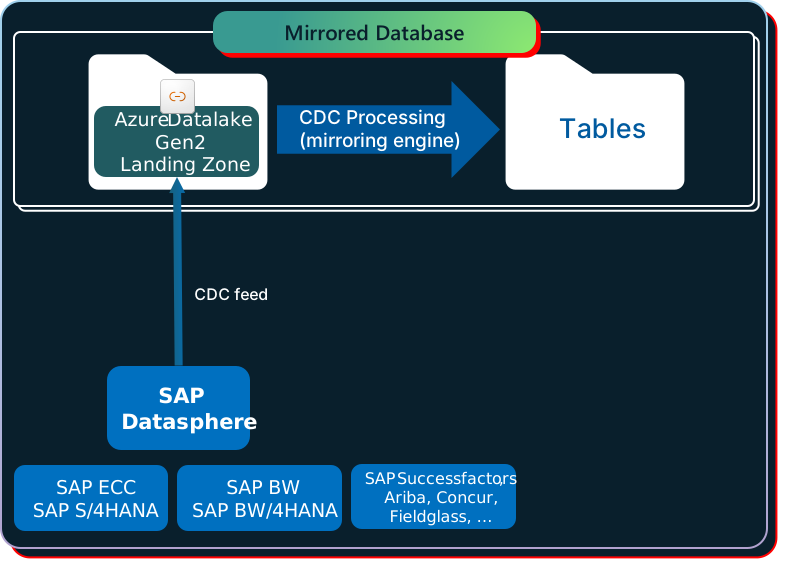
Figure 8: SAP Mirroring in Fabric - Basic Architecture
Agent Skills for Fabric
A couple of weeks ago, Microsoft introduced Agent Skills for Fabric, a toolkit designed to make it easier to integrate with Fabric in an agent-driven world. Instead of agents just pulling data or summarizing insights, they can now interact with Fabric workloads in a more structured and governed way. Through a growing library of reusable skills, agents can query data, trigger workflows, and work with Fabric assets using well-defined interfaces.
It also opens the door for developers to bring in external AI tools like Claude and other models, so you’re not locked into a single ecosystem when building these experiences. In practice, this moves things beyond simple insights and toward agents that can actually help get work done inside Fabric, all within the boundaries you define.
Surge Protection and Capacity Overage Protections
Another practical update coming out of the conference is the introduction of surge protection and capacity overage protections in Fabric. As more organizations move real workloads onto the platform, managing capacity spikes and unexpected usage becomes a lot more important. These new safeguards are designed to help prevent runaway consumption and give teams more control over how and when capacity is used.

Figure 9: Enabling Surge Protection in the Fabric Admin Portal
In practice, this means fewer surprises when workloads spike. Teams can set clearer boundaries, avoid unplanned overages, and keep critical workloads running smoothly even when demand fluctuates.
Maps in Fabric
Although they've been in public preview for a while, it was nice to see Maps in Fabric reach general availability. As Microsoft continues to bolster its Azure Maps functionality while expanding partnerships with leading geospatial platform providers like Esri, developers are benefiting from having access to native geospatial capabilities within the platform. For organizations that rely on location-based data, this opens the door to richer, more interactive visualizations without having to rely on external tools or custom integrations. Whether it’s plotting assets, analyzing service territories, or tracking regional performance, teams can now work with spatial data more naturally within their existing Fabric workflows.

Figure 10: Working with Maps in Fabric
Fabric IQ Evolution
Last year at the Ignite conference, Microsoft introduced a new intelligence framework that sets the foundation for their entire copilot/agentic AI strategy: Microsoft IQ. As you can see in Figure 11 below, the Microsoft IQ framework is comprised of three distinct layers:
- Work IQ: This layer provides context around how work actually happens across the organization, including people, conversations, and content. From a data perspective, that includes Office documents in OneDrive and SharePoint, emails and calendar events from Outlook, and collaboration signals from tools like Teams, Planner, and Loop. Under the hood, Work IQ is powered by Microsoft Graph, which connects all of this work-related data and relationships into a unified view.
- Fabric IQ: As the name suggests, this layer is built on business data models curated/hosted in Fabric — more on this in a moment.
- Foundry IQ: Foundry IQ serves as the execution and composition layer of the Microsoft IQ framework. If Work IQ and Fabric IQ provide the “what” in terms of context and data, Foundry IQ delivers the “how,” bringing models and execution into the picture. Under the hood, it’s built on the AI models, services, and orchestration capabilities of Microsoft Foundry, enabling teams to design, connect, and run agents that can actually act on that context.

Figure 11: Microsoft IQ Framework Overview
While Microsoft’s IQ strategy makes sense at a high level, the details have been a bit light up to this point, especially as it relates to Fabric IQ. At FabCon, Microsoft laid out their vision in vivid detail. Let's break it down.
General Availability of Data Agents
Data Agents were one of the first tangible pieces of the Fabric IQ vision coming into focus. As you can see in Figure 12, data agents are grounded in data models curated in OneLake, including semantic models, lakehouses, and data warehouses. Meanwhile, business analysts and other data specialists provide the context and guidance that shape how the agent understands and interprets the data from a business perspective. You can find out more about how data agents work in our previous article here.

Figure 12: Fabric Data Agent Concept
Graph in Microsoft Fabric
Within the context of Fabric IQ, Graph in Microsoft Fabric, now in public preview, brings relationship awareness into the mix. While Fabric has always been strong at organizing and querying data, Graph adds the ability to understand how things are connected, whether that’s relationships between customers, products, transactions, suppliers, or even entire business processes. Instead of just analyzing tables, you can start to explore networks of data and uncover patterns that aren’t obvious in a traditional relational model.

Figure 13: Building Graphs in Microsoft Graph
This becomes especially powerful in an IQ-driven, agent-based world. It gives data agents more context to reason over, helping them move beyond simple queries to more meaningful insights and recommendations. Whether it’s identifying hidden relationships, tracing dependencies, or understanding how different entities influence each other, Graph adds another layer of intelligence that makes Fabric IQ more context-aware and actionable.
Fabric Ontologies
Hot off the presses, Fabric Ontologies, now in preview, represent one of the more forward-looking additions to Microsoft’s Fabric IQ vision. Ontologies introduce a semantic layer that brings structure and shared meaning to enterprise data.
Instead of relying only on tables, schemas, or even individual semantic models, ontologies define key business concepts and how they relate to one another across the organization. This creates a consistent, reusable foundation that helps ensure both users and AI are working from the same understanding of the business.
What makes ontologies especially powerful is their ability to capture not just definitions, but also business logic. Organizations can embed rules and constraints directly into the ontology, turning what is often implicit knowledge into something explicit and operational. That means when certain conditions are met, the system can trigger actions, alerts, workflows, or updates automatically. In this way, ontologies move beyond simply organizing data and start to play an active role in how the business runs, helping bridge the gap between insight and execution.

Figure 14: Working with Fabric Ontologies
Operations Agents
Operations Agents represent another new entry in the Fabric IQ framework. Building on Fabric Real-Time Intelligence, operations agents are intended to bring the “digital labor” concept into more practical, day-to-day use. While much of the agentic conversation around Fabric has focused on data and insights, operations agents shift the focus toward action.
Whereas data agents are primarily designed to integrate with conversational experiences like custom agents built in Copilot Studio, operations agents operate more in the background, behaving more like autonomous agents that continuously monitor and respond to what’s happening across your environment.
What makes operations agents interesting is how they tie together data, logic, and execution. They can be configured to watch for specific triggers, whether that’s a threshold being exceeded, an anomaly detected, or a business rule being met, and then take action in response. That might mean kicking off a workflow, sending an alert, updating a system, or coordinating with other agents. It’s an early but meaningful step toward a more proactive operating model where systems don’t just inform decisions, but actively help carry them out.
We'll have a lot more to say about operations agents in the weeks to come.
Fabric Planning
Last, but not least, we have Fabric Planning. Fabric Planning is Microsoft’s way of bringing planning directly into the Fabric experience, moving teams from simply looking at historical data to actually forecasting what’s coming next. Instead of treating planning as something that happens outside the platform in spreadsheets or separate tools, it becomes part of the same environment where your data already lives. Teams can use historical trends, current performance, and business context to model future scenarios and make more informed decisions about where things are headed.
What’s interesting here is how it ties planning more closely to execution. Because it’s built on top of the same data foundation, plans aren’t static. They can evolve as new data comes in, giving teams a more dynamic and responsive way to adjust. Whether it’s forecasting demand, planning capacity, or aligning resources to business priorities, Fabric Planning starts to close the loop between insight and action, helping organizations move from reacting to the past to actively shaping what comes next.

Figure 15: Working with Fabric Planning
Closing Thoughts
Stepping back from the week, it’s clear that Fabric continues to move quickly, not just in terms of new features, but in how the overall platform is coming together. What stood out this year wasn’t just the volume of announcements, but how they're starting to connect into a more cohesive vision. From operational databases and governance to agents and AI-driven experiences, the pieces are beginning to align in a way that takes the idea of a modern data platform to the next level.
We’ll have a lot more to say about many of these updates in the weeks and months ahead as we dig deeper into what they mean in practice. As with any fast-moving platform, the real story starts to take shape after the conference, when these capabilities get put to work in real-world scenarios.
For now, it’s hard not to be excited about where things are heading. Fabric is quickly evolving into something much more than a data platform. It’s becoming a foundation for how organizations connect data, AI, and operations in a more unified way, and we’re looking forward to being part of that journey.