



Better Together: Dynamics 365 CRM & SAP — Part Two

Modern CRM solutions call for a flexible platform that can scale to handle ever-changing sales and service requirements. In this blog post, we’ll take a look underneath the hood with Dynamics 365 and highlight some of the core features that have helped it grow into one of the leading CRM platforms on the market.
Dynamics 365 Foundations
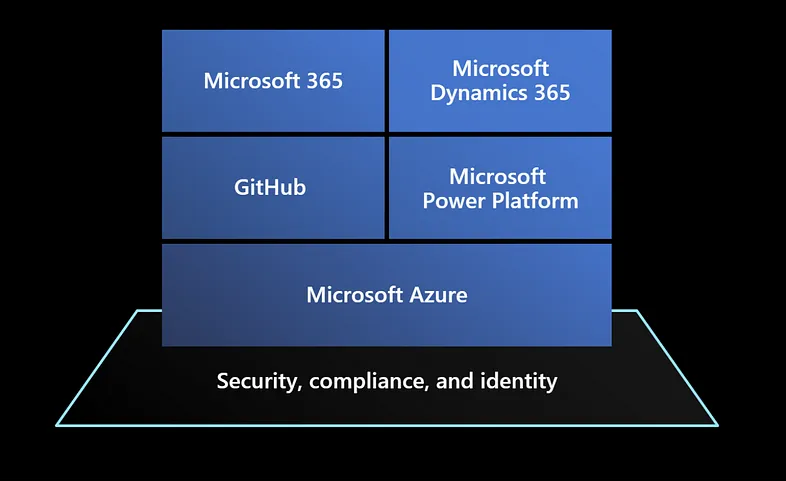
As you can see in Figure 1 below, Dynamics 365 (D365) is a cloud-based Software-as-a-Service (SaaS) solution that was built using a layered architecture:
- The D365 CRM modules (e.g., Sales, Customer Service, Field Service, and Project Operations) run as apps on Microsoft’s Power Platform. Power Platform is a low-code development platform (LCDP) which enables developers of all backgrounds to enhance and extend D365 in a safe and consistent manner.
- At the bottom of the stack, you have Microsoft’s Azure cloud platform. Azure provides the cloud infrastructure, security, and compliance resources that are needed to ensure that D365 is both highly reliable and scalable.

Figure 1: Positioning of Dynamics 365 in Microsoft's Cloud Applications Portfolio
Looking carefully at Figure 1, you can also see that D365 is closely aligned with Microsoft 365 (formerly known as Office 365). This positioning allows D365 to integrate very deeply with Office productivity apps, SharePoint, Teams, and a host of other M365 services.
When it comes to D365 and the Power Platform, Microsoft has employed a “no-cliffs” philosophy to their product designs. In other words, while most common enhancements/extensions can be performed through configuration or low-code development tools, pro-code developers always have the option to dig deeper and tap into Azure services, etc. to extend the reach of the platform. As D365 has matured, we’ve seen that concept applied again and again as Microsoft has incorporated features such as AI and deep learning, multi-channel communication with Azure Communication Services, automation, and much more. In an upcoming blog post, we’ll see how these concepts unlock deep integration between D365 and SAP.
Dynamics 365 Strengths
As we progress throughout this blog series, we’ll have an opportunity to look at key CRM modules up close. For now, let’s set the table by highlighting some of the common strengths of the platform as a whole.
Responsive User Interface
From a user experience (UX) perspective, D365 is built on an HTML5-based framework which is built on responsive design concepts. This means that users can access D365 apps from their desktop, tablet, or smart phone devices. For the most part, these are features that you get for free. In other words, if a change is made to a screen, that change shows up automatically on mobile devices. Figure 2 illustrates the basic look-and-feel of D365 apps on both a desktop PC and a smart phone.

Figure 2: Dynamics 365 Responsive Design
In the mobile experience, we can push the envelope even more by adding in support for offline access, device-specific gestures, and other native device features.
Adaptability & Extensibility
Since D365 runs on top of the low-code Power Platform, it is very easy to enhance and/or extend. Using “what-you-see-is-what-you-get” (WYSIWYG) graphical development tools like the form editor shown in Figure 3 below, analysts can easily add fields to screens, change layouts, adjust labels, and so forth. Business rules and list reports can be built using similar types of graphical tools.

Figure 3: WYSIWYG Screen Editors in Dynamics 365
These types of changes are managed using solution files which provide similar application lifecycle management (ALM) capabilities to the Change and Transport System (CTS) used within SAP.
This kind of modular approach lends itself very well towards building mash-up solutions that are tailored to your industry. For example, a utilities customer might start with the core D365 Field Service module and then deeply integrate it with both SAP and geographic information systems (GIS) like Esri ArcGIS to create a more holistic solution that provides crew members with a one-stop shop for field service operations.
Flexible Integration
One of the key benefits of building D365 apps on top of the Power Platform is that it allows app developers to tap into the advanced features of Dataverse. If you haven’t heard of Dataverse, you can think of it as a managed cloud database with many built-in app development features. Some notable features of Dataverse include:
- Built-in business data types (e.g., instead of defining a “Phone” field as a VARCHAR(10), we can choose a “Phone” data type with built-in constraints which ensure that the user types in a valid phone number).
- Data import with Power Query. Using this graphical suite of ETL tools, we can easily integrate data from a wide variety of data sources.
- OData-based REST API. Every table defined in Dataverse (whether its standard or custom) is exposed as part of Dataverse’s OData v4 REST API.
- Built-in event management. Every time a record is added, updated, or deleted in Dataverse, an event is fired which can be consumed from both Power Automate (a low-code workflow engine provided as part of the Power Platform) or Azure Integration Services.
Collectively, these capabilities make it easy to achieve deep integration with other business systems such as SAP. They also unlock powerful analytics capabilities with tools like Azure Synapse Analytics and Power BI.
Process Automation
Since D365 sits on top of Power Platform, it is deeply integrated with Power Automate, a low-code workflow engine that can be used to build cloud workflows, desktop workflows/bots, and much more. Out of the box, Power Automate includes over 1,300 connectors that can be used to build cross-system process flows. Figure 4 highlights a few common connectors that could be used to create cross-application workflows.

Figure 4: Selected Connectors Supported by the Power Platform
With Power Automate, just about any common CRM-related process imaginable can be automated. For example, in the sales space, a flow could be set up to process a new account. As the customer is being created, a callout could be made to a credit service in real-time to check the customer’s credit score. From there, an approval process could kick in, allowing approvers to respond to requests in real time from both Outlook and Teams. If the customer is approved, then the flow could proceed with collecting digital signatures from DocuSign or Adobe Sign before being replicated into a backend ERP system like SAP.
It really doesn’t matter what the system is — as long as it can send/receive web service messages, Power Automate can talk to it. And even if the system can’t talk web services, we can use Power Automate Desktop to build a bot to automate transaction processing in a legacy GUI app, etc.
Embedded Analytics
These days, D365 apps are infused with quite a bit of embedded analytics. For example, the dashboard shown in Figure 5 provides insights into customer conversations across multiple communication channels. These insights can be used to make better informed decisions.

Figure 5: Embedded Analytics in Dynamics 365 Customer Service
In addition to the built-in reports and dashboards, customers also have the ability to embed their own custom dashboards into the app(s), too. This is normally done using Power BI embedded, but other BI tools could be integrated as well.
The Power BI option is particularly interesting when combined with Azure Synapse Analytics. Using the Azure Synapse Link feature in Dataverse, we can sync up D365 app data in near real time with Synapse. This data can then be combined with other enterprise or external data sources to create complex dashboards that analyze process flow end-to-end.
For example, using Microsoft’s SAP CDC connector, we can easily combine real-time data from both D365 and SAP (ECC or S/4 HANA) in one central repository. From there, we can build streamlined dashboards in Power BI that will show sales or service agents real-time data. We’ll be demonstrating this capability in more detail in a future blog post.
Communications & Collaboration
D365 integrates with nicely with a host of Azure and Power Platform-related communication and collaboration services including Microsoft Teams, Azure Communication Services, Power Virtual Agents, and Microsoft Viva. Some specific examples of collaboration scenarios we can unlock include the following:
- Collaborate on sales deals, customer service cases, etc. directly within Microsoft Teams.
- Set up phone systems for agents to assist customers with various requests.
- Create AI-powered chatbots to provide customers with real-time answers to questions 24x7.
- Set up customer/partner portals that provide self-service access to submit and review requests (e.g., submit an outage case and monitor its progress).
- With Viva, sales agents can track leads and opportunities across channels — Outlook, Teams, and D365.
Decision Support with AI & Machine Learning
In recent years, Microsoft has invested heavily to integrate some of their best-in-class AI and Machine Learning (ML) capabilities directly into D365. In some cases, the use cases are pretty simple. For example, with D365 Sales, the system can track incoming emails and determine if they’re somehow related to say an open sales opportunity.
In other cases, AI/ML could be doing more of the heavy lifting and actually driving business process flow. For example, with D365 Customer Sales, ML is used to analyze incoming requests and intelligently route them to the right agent based on a variety of factors including:
- Agent skill sets
- Agent capacity/availability
- Customer sentiment (e.g., does the customer seem angry enough that they should be routed to a manager?)
These kinds of capabilities also extend to other key CRM functions such as scheduling, KB article selection, preventative maintenance, and so forth.

Figure 6: Monitoring IoT Signals on a Customer Asset Using Dynamics 365 Field Service
Looking Ahead
Hopefully this post has provided a good overview of the D365 platform. Up next, we will zoom in and take a closer look at D365 Sales. This deep dive will give us our first opportunity to explore how D365 can deeply integrate with SAP ERP (ECC or S/4 HANA).