



SAP & AI Builder: Affordable AI Solutions

Whenever you hear people talk about the Microsoft Power Platform, they’re usually talking about Power Apps or Power Automate. However, while it might not get as much press, AI Builder is a criminally underrated module that can really add a lot of value for businesses.
Recently, a customer asked us if it would be possible to use AI Builder to develop some AI scenarios with SAP. The answer is a resounding yes! So, let’s head on over to the Bow-dork lab and see how this works.

What is AI Builder?
If you’re not familiar with AI Builder, you can think of it as a set of low-code tools that can be used to create AI models. Out of the box, it comes with some pre-built AI models that you can adapt for your specific purposes:
- Document Processing (e.g., invoices, receipts, and so forth)
- Text Recognition (e.g., handwritten notes)
- Sentiment Analysis
- Entity & Key Phrase Extraction (mining text for useful bits of input)
- ID & Business Card Reader (e.g., scanning government IDs, etc.)
- Object Classification
- Language & Text Translation
AI Builder also provides support for developing custom AI models using pro-code tools and services included with Microsoft Azure, so you can get pretty fancy with this stuff if you want to.
For selected use cases, AI Builder can really accelerate your development timelines. Although there’s still a lot of work to do, it’s way more efficient than starting from scratch in Azure Machine Learning.
Custom Document Processing with AI Builder
Although our customer was mostly kicking the tires on AI Builder, the most pressing use case they were exploring involved document processing. Without getting too far in the weeds, they were receiving PDF-based bill of lading documents from a 3rd-party logistics provider (3PL) and needed to extract the data from the form and true it up with SAP shipment documents.

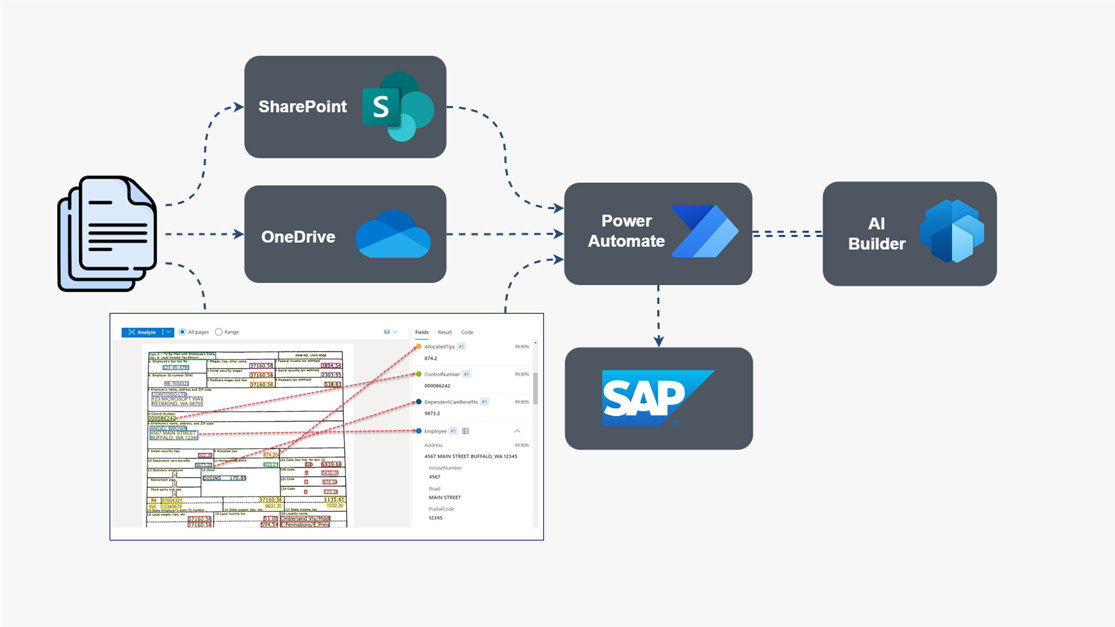
Currently, these documents were being received via email and then uploaded to SharePoint or OneDrive. From there, the goal was to create a workflow process that would pick up the files, extract the data, and then load it into SAP — see Figure 2 below for a conceptual overview of the to-be process.

At a high level, the steps required to pull this off are as follows:
Train a custom document processing model in AI Builder on some legacy documents. This requires some up-front work to carefully analyze the documents, test the output, and verify the results.
Once the custom AI model is in place, we can build a cloud flow in Power Automate to orchestrate the data processing pipeline using the standard Outlook, SharePoint, and OneDrive connectors.
At runtime, the raw documents are sent over to AI Builder to extract the data.
The data from AI Builder is returned in JSON format, so there’s a fair amount of data wrangling/parsing to be done to get it into the right format.
Finally, once we’ve summarized the document data, we can send the data on to its final destination in SAP. Here, we could apply updates to the shipment record and also attach the original attachment to the shipment for audit trail purposes.
Though your mileage can vary somewhat depending on the complexity of the documents and SAP integration, this is the type of solution that can come together in a matter of weeks. In this example, we were talking about shipping, but we could just as easily be talking about invoices, receipts, and other types of paper forms. The same basic concepts apply.
Other Use Cases
Zooming out a bit, it’s worth noting that any of the OOTB AI models described earlier can be used to build SAP-centric solutions. Here, it’s worth noting that the processing doesn’t always have to happen outside of SAP — we can also leverage these AI models from within SAP. Some other potential use cases include the following:
- Text Recognition: Imagine a Fiori-based work order app where the user wants to upload and transcribe handwritten notes. Within the Fiori app, we can upload the image file as per usual and then write some ABAP to create a real-time call out to Power Automate via an HTTP trigger and then let Power Automate and AI Builder do their thing to transcribe the notes and send back the text to store in SAP.
- Document Generation: Imagine a process where you’re generating a PDF document (e.g., SAP Interactive Forms by Adobe or Smart Forms) and need to translate the text into the recipient’s preferred language. Similar to the text recognition scenario, we could create a cloud flow that would send out the text body of the document for translation in Power Automate and then plug in the results.
- Sentiment Analysis: Imagine a case where customer feedback is being loaded into the notes section of a service order, etc. Upon receipt of that text, we create a job which calls out to Power Automate/AI Builder to analyze that text to determine whether or not the customer’s getting frustrated with their service. Pending the results, we can then follow up with the customer service agent to see what’s going on and possibly take steps to address the customer’s frustration.
Closing Thoughts
Hopefully this little whirlwind tour has helped illustrate how AI Builder can be used to quickly enhance SAP with some pretty advanced AI capabilities. From a productivity perspective, these types of solutions can be a real game changer for the business. Plus, they’re more affordable than you might think.
At the time of this writing, you could get started with a Power Automate Premium license that runs for $15 per user/month. If you only have a handful of users working on solutions like this within a given department, the cost of entry is pretty low and approachable.