



Microsoft Copilot and the Future of UX in the Enterprise

Last year, during the introduction of Microsoft Copilot, Satya Nadella proclaimed that we’re living in the age of copilots. This is a bold statement, and it has many of our customers asking us what it all means.
With that in mind, I thought it would be useful to take a look at how Microsoft Copilot technology has evolved over the course of the past 6 months. Specifically, I want to examine this evolution from the perspective of the end users that are starting to come up to speed with these solutions. Here, we’re seeing a fundamental shift in user experiences that’s turning “forms over data” on its ear.
Humble Beginnings
Much like ChatGPT itself, the UX for early incarnations of Microsoft Copilot was mostly limited to that of a basic chatbot-style user interface. For example, Figure 1 illustrates what the user interface looks like for Copilot for Microsoft 365. As you can see, besides a few canned prompts and some contextual toggle switches, users are mostly relegated to interactions through a basic chat prompt.

Figure 1: Copilot for Microsoft 365 UX
The next evolution came in the form of embedded copilot experiences. For example, Figure 2 demonstrates the user experience for Copilot for Dynamics 365. Here, users have a collapsable side panel that still mostly consists of a basic chatbot UI. However, unlike generic chatbots, these embedded bots are much more highly specialized and context aware. For instance, in Figure 2 you can see how the copilot helps users navigate within Dynamics 365, search for records in the system, and get answers to questions about how to process a given transaction.

Figure 2: Working with Copilot in Dynamics 365 Business Central
Moving Beyond Chatbots
As Copilot experiences have continued to expand and evolve, the driving force behind the scenes has been Microsoft Copilot Studio. For historical context, Copilot Studio absorbed the solution that was formerly known as Power Virtual Agents. As part of the Power Platform, Power Virtual Agents was positioned as a low-code tool that could be used to build conversational bots.
As Copilot Studio has evolved, it has expanded beyond the functionality of Power Virtual Agents, incorporating elements from various powerful tools and services to create an advanced copilot development experience. Some of the more notable features include the following:
- Azure AI Integration: From the natural language processing of the Azure OpenAI service and other cognitive services to “bring your own (AI) model” (BYOM), Copilot Studio makes it easy to infuse advanced AI capabilities into your agents.
- Knowledge Sources: With an expanding set of knowledge sources, we can enhance the effectiveness of generative answers by incorporating data from external websites, SharePoint repositories, Dataverse, and more.
- Copilot Connectors: With over 1,500 connectors available out of the box and support for custom connectors, Copilot makes it easy to surface data from a wide variety of systems and data sources.
- Power Automate Actions: This feature introduces a powerful logic and execution layer that can be used to transform basic chatbots into intelligent agents that are able to automate many common tasks.
- Adaptive Cards Integration: With Adaptive Cards integration, we can dynamically incorporate mini-app experiences into the chat interface, saving users from having to leave the agent and navigate over to other applications to perform one-off tasks.
Reimagining the Art of the Possible with Modern UX
Copilot’s capabilities have given UX designers a blank canvas to completely rethink and reimagine user experiences. With advanced AI tools at their fingertips, designers can explore new interaction paradigms and create more intuitive, personalized interfaces. This opens up exciting possibilities for crafting user experiences that are not only more engaging but also perfectly aligned with users’ evolving needs and expectations.
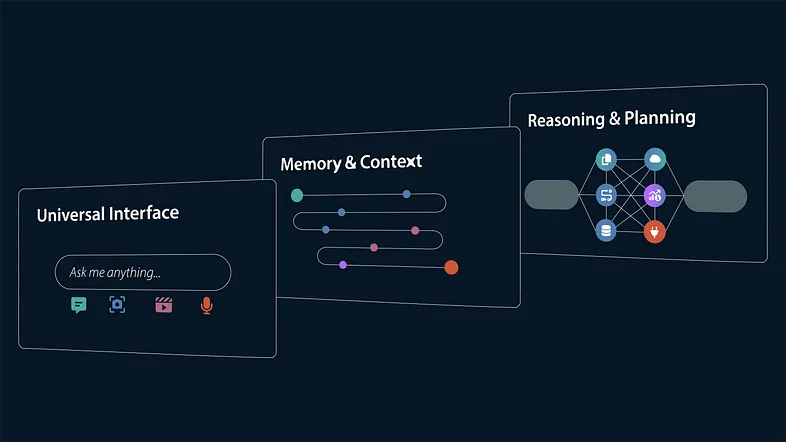
To put all this into perspective, consider the agent depicted in Figure 3. This agent has a very simple interface that enables the user to communicate with it in a number of different ways:
- Basic chat
- File / image uploads
- Audio
- Video

Figure 3: Moving Beyond Forms Over Data with AI Technology
This expanded universal interface is powerful, but still ultimately annoying if the agent is “forgetful” in the sense that it doesn’t maintain context between interactions. That’s where the advanced generative AI capabilities of Copilot/Azure come into play — providing the memory and context needed to enrich the user experience.

Figure 4: There's Nothing Worse Than a Bot that Asks You the Same Question Over and Over
Looking closely at Figure 3, the last piece to the puzzle is the reasoning and planning layer which enables the agent to more deeply understand what the user is asking for and respond by performing complex automated tasks (e.g., via Power Automate).
When you put all this together, one of the notable outcomes is that universal interfaces like the one shown in Figure 3 replace the traditional “forms over data” UI that has dominated the enterprise software space for decades. Looking back at the embedded experience with Copilot for Dynamics 365 (see Figure 2), these modern user interfaces move the copilot experience to center stage and users are only redirected to forms on an exceptional basis.
Another major shift with the agent approach is that it enables users to interface with the system directly within the productivity tools they work with every day — notably Microsoft Outlook and Teams. This approach builds on the Teams superapps concept we touched on in this space a few months ago.
To put this into perspective, imagine that there’s an agent coordinating a complex investigation process. In a traditional “forms over data” approach, each participant in the investigation process would have to log onto some kind of incident management system, pull up the investigation record, and fill out a form. However, with adaptive cards technology, intelligent agents can push requests to users through Outlook or Teams (see Figure 5). The user can quickly fill in the form, submit it, and then go back to whatever they were doing.

Figure 5: Working with Adaptive Cards
This is just the tip of the iceberg in terms of what’s possible. For modern UX designers, the game has been changed significantly.
Closing Thoughts
As we’ve seen here today, Microsoft Copilot and intelligent agents have completely revolutionized modern user experiences, transforming how we interact with technology. Although it’s early days, it’s amazing to think how far these experiences have already evolved in roughly 6 months’ time.
For years, we’ve boxed UX designers into forms-based UI design languages such as Microsoft’s Fluent UI or SAP Fiori. Now, for the first time ever, UX designers truly have a blank canvas to work from, allowing them to innovate and craft experiences that are more intuitive, personalized, and engaging than ever before. As we continue to embrace these advancements, the possibilities for enhancing user interactions are limitless, promising an exciting future for both designers and users alike.
We’ll have much more to say (and show) about these experiences in this space in the weeks and months ahead. So, stay tuned — things are moving quickly in this space.