



Building a Scalable Data Strategy with Power Platform

One of the major strengths of the Power Platform is its ability to talk to just about any system imaginable. With over 1,500 connectors available out of the box and support for the creation of custom connectors to fill in connectivity gaps, makers have plenty of tools to build connected solutions.
While these connectors are very powerful, we’ve observed that makers have a tendency to lean too heavily on connectors — overlooking the complexities and limitations that real-world data access can present. This, in turn, opens up a broader discussion on the need for a robust and scalable data strategy, especially as Power Platform adoption increases within organizations.
With that in mind, today we’ll explore some ways to create a more robust and scalable data strategy within your Power Platform environments.
Understanding Connector Limitations
Power Platform connectors — whether standard or custom — are built on top of REST APIs. Whether we’re talking about a structured protocol like OData or a home-grown REST API that follows certain patterns, REST APIs generally support up to 6 different types of operations (see Figure 1).

Figure 1: REST API Operation Types
Of the 6 different operation types shown in Figure 1, there is one that typically stands out from all the rest in terms of usage and performance: queries. While basic CRUD (Create, Read, Update, and Delete) operations tend to operate on a simple object (e.g., a customer record or a sales order), queries might parcel through thousands or even millions of records at a time.
Although some APIs can handle bulk queries, your mileage can vary greatly:
- Some APIs will time out when tasked with processing large queries. Indeed, I ran into a situation the other day where a customer was calling a connector that was trying to scan data from a pair of tables that contained over a billion records.
- The query operation(s) provided by the API may not be flexible enough to support your application use case (e.g., you want to sort/filter on an attribute that’s not supported by the API).
- Even if the API can process the query, it may not be performant. For example, if you were to use a BAPI function to lookup equipment records in SAP using the SAP ERP connector, performance can be pretty slow due to the fact that the standard BAPIs often scan through a number of tables that you might not need to fetch in your particular query.
- Although some connectors/APIs abstract away complex pagination operations, there are many that push those requirements back onto the client.
These types of limitations illustrate the need for a holistic data strategy when building solutions using Power Platform. When it comes to processing CRUD operations or onesy-twosy transactions, connectors are where it’s at. For larger scale applications though, we need something a little more industrial strength.
Data Replication to the Rescue?
When faced with performance issues, we often see customers gravitate towards building some kind of ETL job to load the data directly into Dataverse (the cloud database that lies at the center of the Power Platform). Here, the basic idea is to bring the data closer to the application which, in turn, should streamline operations and improve efficiency.
Although this approach is technically an option, it can be a rather expensive one since these additional tables may push you over the edge in terms of your allocated Dataverse storage and usage quotas. Fortunately, as we noted in this space recently, Dataverse is more than just a database.
Data Virtualization with Dataverse
A very powerful feature of Dataverse is its support for virtual tables. As the name suggests, virtual tables are tables that integrate data from external systems without replication.
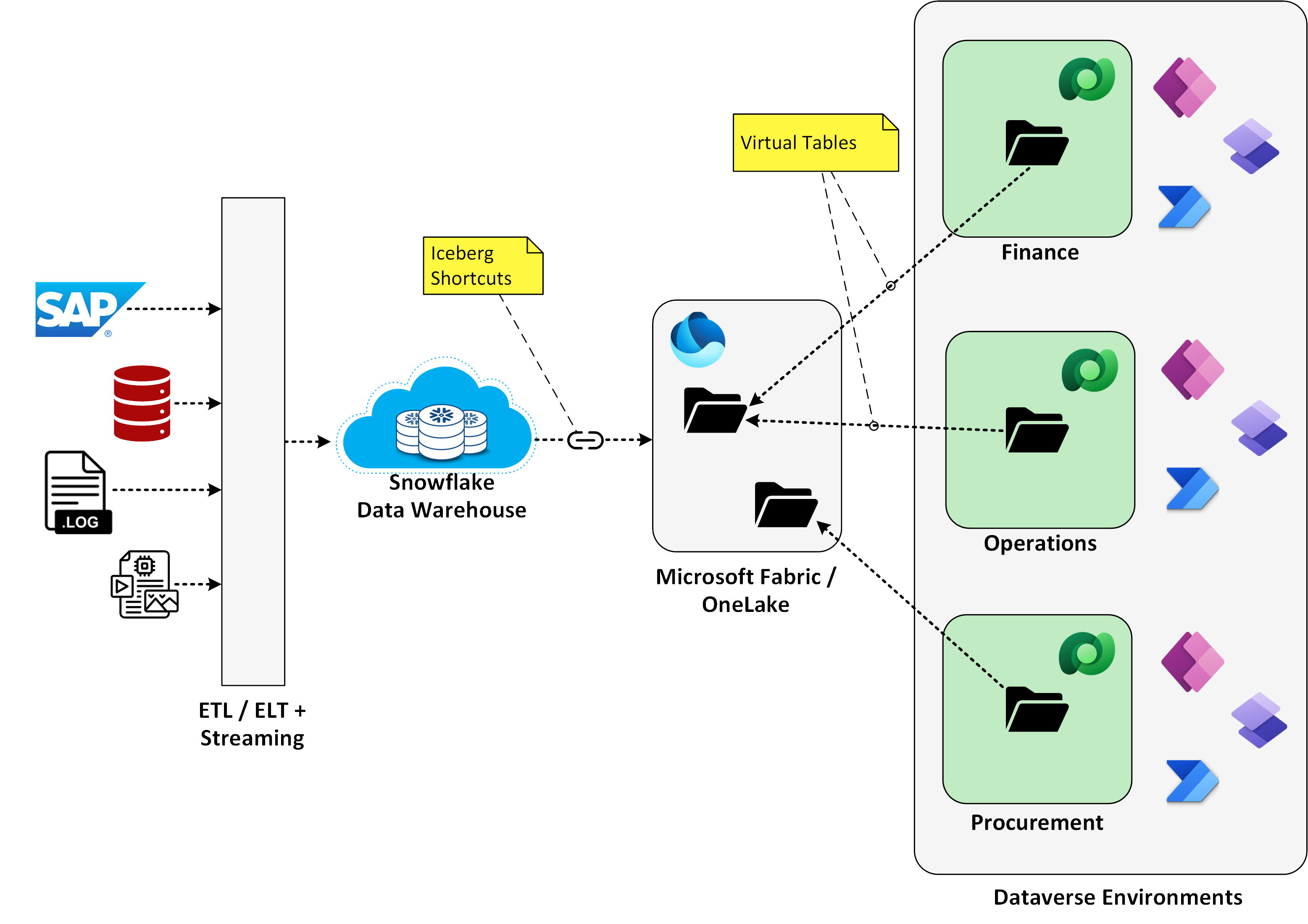
To put this concept into perspective, consider the diagram contained in Figure 2 below. Here, a customer has built up a robust cloud data warehouse using Snowflake (although we could just as easily be talking about other data storage or data warehouse systems such as Google BigQuery). As you can see on the left-hand side of the diagram, this cloud data warehouse is already ingesting data from SAP and a host of other enterprise systems.

Figure 2: Building Data Marts to Simplify Data Access with the Power Platform
Since Snowflake already has all the data that our downstream Power Platform solutions need, what we want to do is use that data to create virtual data marts in Dataverse. One way to accomplish this is to use Fabric Mirroring to selectively mirror common entities (e.g., customers, products, and pricing conditions) into Microsoft Fabric/OneLake. Then, from there, we can create virtual tables in Dataverse that point to the data that’s stored in low-code OneLake storage. The animated GIF file contained in Figure 3 below shows how this all comes together in Dataverse.

Figure 3: Building Virtual Tables Using Fabric in Dataverse
Once we have the virtual tables in place, it’s easy to consume the data across the Power Platform. To these consumers, the virtual tables look like any old garden variety table. For makers, this means that:
- You can use graphical, WYSIWYG tools to quickly build forms and screens in Power Apps and Power Pages.
- You can create Dataverse views to support advanced search and lookup requirements.
- You can incorporate these virtual tables in lookups and queries in Power Automate.
- You can use the Dataverse role-based access concept (RBAC) to control access to tables.
Collectively, these capabilities make it easy to integrate bulk data into your existing applications. Then, whenever users want to drill in and process individual records, we can leverage connectors to perform basic CRUD operations, etc. This mix-and-match approach simplifies the app design and offers much better scaling.
Building on Microsoft Fabric
One of the great things about this virtualization approach is that it enables you to take advantage of all the robust features within Fabric and OneLake. Although the example above demonstrated how this concept works for a customer running Snowflake, we can easily adapt this for other data warehouse architectures.
For example, if your data is stored in Amazon S3 buckets, we don’t even have to turn on mirroring, we can just create a shortcut to the data and we’re up and running. Some common data sources that pretty much work straight out of the box include:
- SQL Server and/or Azure SQL
- Azure Cosmos DB
- Azure Synapse Analytics
- Amazon S3
- Google Cloud Storage
- Snowflake
Power BI & Embedded Analytics
In some cases, you might not even need to bring the data into Dataverse/Power Platform at all. With Power BI, we can incorporate embedded analytics into Power Apps solutions that pull from data sources that reside outside of Dataverse/Power Platform (see Figure 4).

Figure 4: Embedding Power BI Reports in Power Apps
Going the other direction, we can embed Power Apps into Power BI reports to support more advanced drill-across and drill-in capabilities. See Figure 5 for a rough cut example that shows how this works.

Figure 5: Embedding Power Apps inside of Power BI Reports
Right Tool for the Right Job
For Power Platform solution architects, these are exciting times. Thinking back on the early days when it was connector or bust, we have so many additional tools in the tool bag to work with these days.
This is particularly true with Microsoft Fabric and OneLake. With low-code enabled tools such as Data Factory, it’s surprisingly easy to build data marts that can be shared across your Power Platform environment landscape. OneLake storage is cheap, so the only real variable in terms of cost is with the compute resources required to tune your queries. With careful design, you can thread the needle between:
- Scaling your Power Platform landscape
- Improving performance / user satisfaction
- Reducing development costs
- Saving money on Dataverse storage
Closing Thoughts
After nearly 6 years in the marketplace, it seems like many customers are reaching a level of maturity where these types of data issues take center stage. Building entry level solutions on top of SharePoint and Microsoft 365 apps is one thing. However, once you start building enterprise-grade solutions that integrate with large-scale business systems like SAP or Oracle, data volume and performance issues present some very complex challenges.
If your organization has reached this crossroads, then I would highly recommend spending some time carefully thinking through your long-term data strategy. In the early days of Power Platform adoption, it’s easy to spin up new Dataverse environments left and right and operate without a formal data strategy. Unfortunately, this approach usually results in a significant amount of technical debt/rework.
As always, we welcome your feedback and would be happy to field any questions you may have on these topics. Now that Fabric is generally available, look for a lot of movement in this space in the weeks and months to come.