



AI Convergence: Copilots vs. Agents

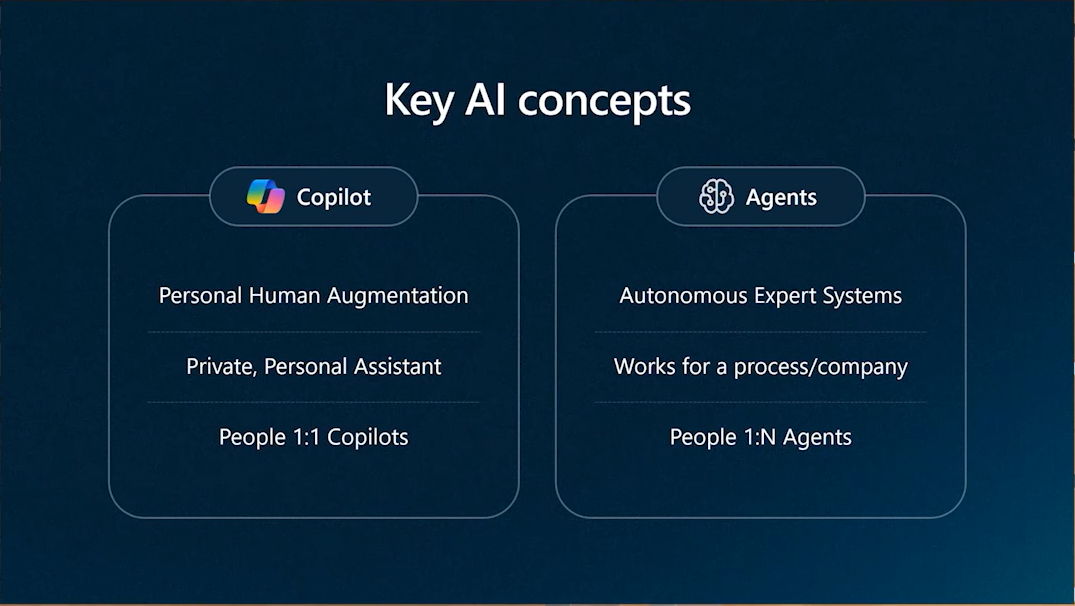
Microsoft recently rolled out some exciting new features for Microsoft Copilot and Copilot Studio as part of their Wave 2 update, once again reshaping how AI fits into the modern workplace. With new features like event triggers (in preview) and advanced reasoning with deeper generative AI integration, copilot(s) are being enriched with abilities to track long-running processes, make adjustments on the fly, and even take action based on real-time data.
By combining copilots and the newly-introduced autonomous agents, Microsoft is creating a new class of AI solutions that do more than just respond—they actively support and streamline work. Let’s take a closer look at how this shift is reshaping how we work and the apps we rely on.
From Chatbots to Autonomous Agents
To fully appreciate this shift that we're seeing, it's helpful to look at how we got here. For some, this journey started back in 2016 when Microsoft introduced their Azure Bot Framework. Then, about 3 years later, Microsoft introduced Power Virtual Agents, an alternative for makers that prefer to work with low-code solutions.
In those days, the focus was on creating basic chatbot experiences (see Figure 1 below). While there was some intelligence baked into these chatbots, the user experience was well limited to a handful of topics and some basic canned responses and actions.

Figure 1: Building Chatbots with Power Virtual Agents
Then, in 2023, Microsoft introduced the world to Microsoft Copilot and Power Virtual Agents was reimagined to become Copilot Studio. While Microsoft Copilot and its integration across Microsoft 365 and the rest of the Microsoft Cloud is a topic unto itself (and one we've covered quite a bit on this blog), let's focus our attention on Copilot Studio.
In some respects, the initial release of Copilot Studio simply added all sorts of generative AI capabilities to what was already there with Power Virtual Agents. As straightforward as this might sound, these updates were extremely transformative in terms of the types of user experiences it unlocked. Whereas before, we were in the business of building basic chatbots that were heavily scripted (e.g., "if the user says this, do that"), these new generative AI-powered features empowered makers to enhance their bots with all kinds of reasoning capabilities.
Marketing hype aside, in a period of less than 6 months, we were able to transcend from basic chatbots to custom copilots that could be trained on domain-specific knowledge sources (e.g., department training manuals on SharePoint). This new breed of copilots is much smarter than basic chatbots and provides far better user experiences.
While all this was going on, Microsoft was also making big advancements with Power Automate, a cloud-based workflow and automation service that's deeply integrated with Copilot Studio. By integrating generative AI capabilities to both the development and runtime environments, makers now had access to the tools they needed to create dynamic workflows which could think and reason on their own. This is a huge advancement for static workflows that were littered with lots of brittle and complex conditional logic gates.
So, just as Copilot Studio enabled us to move from basic chatbots to personalized copilots, advances in Power Automate has allowed us to move from static workflows to autonomous agents.
A New Era of AI-Powered Solutions
Fast forward to today and what we're seeing is a broad spectrum of copilot and agent solutions that can be mixed-and-matched to address specific sets of requirements. Perhaps even more interesting is the possibility for convergence between these two experiences.

Figure 2: Spectrum of Copilot and Agent-Based Experiences
With the aforementioned announcement for event triggers, it will soon be possible for copilots to respond to events such as the upload of a file, an update to a record in a database table, or the posting of a transaction (see Figure 3 below). This exciting new feature greatly extends the reach of copilot solutions.

Figure 3: Adding Event Triggers to Copilots in Copilot Studio
Blending Copilot and Agent Experiences
While it's still early days and some of these features are still in preview, we're starting to see what the future looks like when all these features come together. Although event triggers were primarily introduced to streamline the development of autonomous agents, they can also be used in tandem with other copilot features to launch interactive copilot sessions.
To put this concept into perspective, imagine that a transaction is posted in a backend ERP system (e.g., SAP or Oracle) which requires immediate action. With event triggers, we can build an agent to listen for this event and then launch a copilot session where we interactively collect relevant information from impacted user(s). Finally, armed with this information, the copilot can then hand the request off to an autonomous agent which can perform follow-on tasks in the background.
While it takes some careful design to get right, this integration enables copilots to play a much larger role in business process optimization by working together to tackle complex workflows. Behind the scenes, agents handle coordination, track progress, and take care of repetitive tasks. When they need a user’s input, these agents can "wake up" a copilot to jump in and engage through chat, voice, or interactive UIs using Adaptive Cards. This teamwork between agents and copilots brings a whole new level of automation—keeping processes moving efficiently while looping in users only when their input really matters.

Figure 4: Interaction Between Copilots and Autonomous Agents
Closing Thoughts
The convergence we’re seeing with Microsoft Copilot Studio is opening up a whole new world of AI-powered work. While it’s still early days, the potential is incredible. For the first time ever, we're able to transcend beyond basic "forms over data" and move into a space where AI copilots and agents can manage processes, predict needs, and engage with users dynamically. This shift is going to empower teams to work smarter, handling complex tasks automatically while keeping people involved where they’re really needed. It’s an exciting time, watching AI grow from a helpful tool to an essential partner in getting things done.
We'll have plenty more to say about these concepts in this space in the weeks and months to come, so stay tuned and definitely drop us a comment to weigh in with your thoughts.