



Microsoft Power Platform: More Than Just a Toy

Over the past several weeks, I’ve had interesting conversations with IT leaders who have dismissed Power Platform as little more than a toy. In their opinion, while Power Platform may provide a nice little sandbox for citizen maker types to go build productivity apps on top of SharePoint, it’s in no way suited for enterprise-grade app development.
For certain types of apps, I understand where these opinions come from. After all, this is not the first time that vendors have come along over-hyping the capabilities of their low-code development platforms. And, as someone from a pro-code background, I agree that low-code platforms are not a silver bullet. On the other hand, I think this position dismisses just how far Microsoft (and others) have advanced in this space.
In this blog post, I will attempt to debunk some common misconceptions we see/hear surrounding the enterprise readiness of Power Platform. In the end, I hope this post will compel you to give Power Platform a closer look. We think that this investigation will be well worth your time.
Building on Azure Foundations
In the ultra-competitive enterprise low-code application platform space, one of the things that sets Power Platform apart from the competition is that it’s built from the ground up on Microsoft’s Azure cloud platform. This has several key implications:
It means that Microsoft didn’t just start from scratch when it rolled out core services like Power Apps or Power Automate. For example, Power Apps grew out of Microsoft’s industry-leading Dynamics 365 CRM platform, a platform that’s been running CRM workloads for large enterprise customers since the mid-2000s. Similarly, Power Automate and Power Virtual Agents are low-code analogs to their industrial-grade PaaS counterparts: Azure Logic Apps and Azure Bot Services, respectively.
It means that the Power Platform is both reliable and scalable, leveraging enterprise-grade PaaS services such as Azure Active Directory, Azure SQL, Azure serverless compute resources, and much more.
It means that developers/makers always have an escape hatch with Azure if they bump up against any limitations of the low-code toolset.
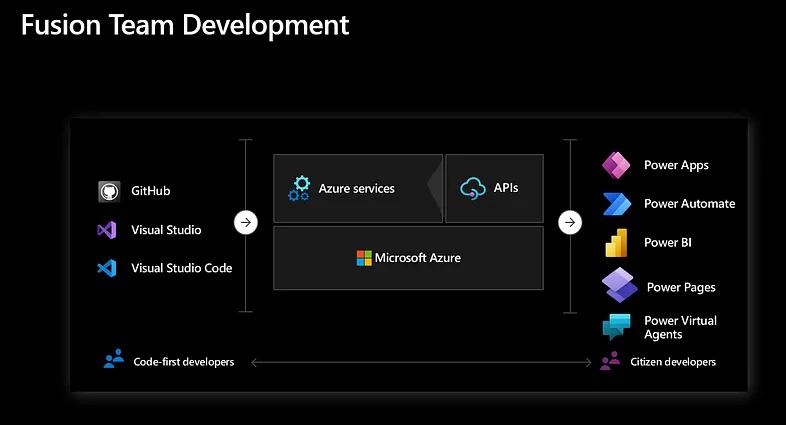
As Charles Lamanna (Microsoft’s VP of Business Apps) so eloquently put it, Microsoft employs a “no cliffs” philosophy with the Power Platform where makers can always drop into a deeper layer of code of functionality to get the job done. You can see this philosophy embodied with each new release of the platform as Microsoft rolls out more and more tools and features to support fusion team development.

Figure 1: Fusion Team Development Concept with the Power Platform
What About Those Silly Canvas Apps?
A lot of the pushback we hear from IT leaders is that they’ve seen a few home-grown Power Apps canvas apps and they just look bad. Or, maybe one of their developers took Power Apps for a spin and got tangled up with Power Fx. Whatever the case may be, the reality is that first impressions are everything and for many, that first impression with Power Apps may have been a bit underwhelming. If that happens to be your experience, here are some important things to bear in mind:
- Power Apps have come a LONG way from where they were even 1 year ago.
- If you simply park citizen makers in front of a blank canvas and tell them to build an app from scratch, you’re probably going to run into some interesting UX design choices (e.g., liberal use of the Comic Sans font, huge colorful buttons, etc.).
- Like any programming language, Power Fx takes a while to get the hang of. Writing Excel-like formulas is one thing but being able to think in a declarative language like Power Fx requires some getting used to. This is no different from learning how to apply functional programming techniques in Python or navigate JavaScript-based SPA frameworks such as React or Angular.
- Canvas apps are NOT the only game in town when it comes to Power Apps. Model-Driven Apps offer an excellent alternative for building enterprise-grade apps and the user experience is similar to that of Dynamics 365.
As Power Apps has evolved, Microsoft has smoothed out some of the rough edges to make it easier for both citizen makers and pro-code developers to be productive building Power Apps. For example, by adopting the Fluent UI design system, makers now have more advanced UI controls that have a similar look-and-feel to other Microsoft business apps (e.g., Office and Dynamics 365) — see Figure 2 below. The adoption of a common UI design language has provided makers with more of an “on-rails” experience for developing UIs in Power Apps.

Figure 2: Power Apps Streamlined UX
Microsoft also introduced the concept of custom pages which make it easy for makers to incorporate canvas app components into model-driven apps. And, if you can’t find the right UI control for what you’re looking for, you can always create your own control using the new(ish) Power Apps Component Framework (PCF). Figure 3 below shows what this combined Power Apps user experience can look like.

Figure 3: Working with PCF Controls
As Power Apps continues to mature, makers will be able to leverage even more reusable components to kickstart the development process. These types of reusable components make it possible for your UX design team to define a common aesthetic across the enterprise.
Can It Really Handle Productive Workloads?
Performance is another area where we receive heavy pushback from IT leadership. In some cases, these fears are based on actual experiences. In other cases, it’s more of an assumption.
First, let’s address the real-world performance issues. Although performance issues with Power Platform solutions are not uncommon, our experience has been that these issues are frequently a function of poor solution design as opposed to a limitation of the platform itself. For example, some makers new to Power Fx might “punt” complex processing logic over to a series of Power Automate cloud flows instead of trying to figure out how to process collections in batch. As is the case with any development platform (low-code or otherwise), design patterns matter. In many cases, little tweaks like this can have a significant impact on performance.
In some respects, it’s appropriate to think of services such as Power Apps and Power Automate like opinionated frameworks. For the most part, as long as you stick to the script, these frameworks should work and perform as expected. However, if you try to circumnavigate the framework or use it in ways it wasn’t intended, you’re going to run into problems. The general rule of thumb here is to follow along with the framework and then use Azure as an escape hatch if all else fails.
In general, Power Platform can scale to handle massive workloads. Don’t believe me? Well, consider the fact that CRM apps such as Dynamics 365 Sales run on Power Platform. As an industry-leading CRM solution, Dynamics 365 Sales manages huge workloads from Fortune 500 companies from around the world. In these instances, we’re talking about millions of transactions distributed across many concurrent users. As noted earlier, this scalability comes from the underlying Azure platform and services such as Azure SQL, Azure Storage, and Azure serverless compute.
It's Just Not Fully Baked
We probably hear this statement the most — and technically, it’s true. In the grand scheme of things, we’ve barely scratched the surface of what low-code development platforms can accomplish. Since it was released in 2018, Power Platform has grown a LOT — and it’s still growing! Besides investing (literally) billions of dollars into R&D, Microsoft has also invested quite a bit of time listening to customers to understand some of the different ways they would want to use the platform. This feedback loop is important because Power Platform democratizes development in many unprecedented ways, so there’s a lot to consider.

Figure 4: Microsoft R&D Investment Graph
What we’re seeing now is a “hardening” of the platform. Microsoft has been working tirelessly to bridge gaps in development tools, functionality, and infrastructure to continue to mature the platform — and we’re starting to see the fruits of that labor with the introduction of the Power Platform Center of Excellence (CoE) Kit, advanced environmental governance tools, and best-in-class ALM with Azure DevOps and GitHub Actions. Obviously, there’s more work to be done, but the platform is way more fully baked than many people give it credit for.
Low-Code + Pro-Code Unite
In our opinion, the perceived limitations of Power Platform are not so much with the platform itself as it is with the industry figuring out how best to adopt this kind of technology. Although there is a universe where you could just park makers in a sandbox and let them create little Office-based productivity apps, the real value of the platform comes from more widespread adoption across the enterprise — especially as it relates to larger-scale digital transformation initiatives.
Since we’ve been marketing Power Platform development services to customers, we’ve seen more than a 60% increase in our development team’s productivity. However, this spike in productivity did not happen overnight.
Here at Bowdark, we run the full spectrum of Power Platform developer types: from low-code makers all the way through professional developers coming from an Azure or .NET background. For us, the major challenge was coming up with a methodology that enables fusion team members from vastly different backgrounds to come together and play to their respective strengths.
In practice, many of the challenges extend beyond the technical realm. For example, using tools like Power Virtual Agents and Adaptive Cards, we can create brand new user experiences. This sort of innovation has sparked many compelling conversations amongst our fusion team members:
- What do these new user experiences even look like?
- Can we create mash-up apps that incorporate functionality from ERP systems, CRM systems, HR systems, and so forth into one cohesive user experience?
- Do we even need an app to transform this particular business process?
- What if our pro-code developers created connectors/services to empower our makers to be even more productive?
- Can we use AI / machine learning to take all this to the next level?
Although citizen maker types can be productive and add value on their own, they can achieve so much more when paired with just the right amount of IT/technical support to go the extra mile. Plus, the scaling of these teams is off the charts. Instead of consuming 100% of a pro-code developer’s time for a given task, we might only require <10% of their time to support/complement a few makers — freeing both sides up to tackle even more value-add tasks.
Over time, our team of business analysts, UX designers, makers, pro-code developers, and enterprise solution architects have naturally coalesced on some common design patterns and best practices for enterprise-grade app development on Power Platform. What’s most exciting here is that we feel like we’ve barely scratched the surface in terms of productivity — specifically as it relates to the development of enterprise-grade solutions. Indeed, it’s caused us to re-think whether or not it makes sense to try to tackle even larger solutions (e.g., LoB solutions, industry solutions, etc.) — but that’s a topic for another upcoming blog post.
Where Do We Go From Here?
For our customers whose IT departments remain on the fence, our best recommendation is to explore a proof-of-value project so that you can more properly assess the capabilities of the platform up close. With opportunities for quick ROI, this investment will be well worth your time and might turn some skeptics into real believers.
If you’re interested in a Power Platform maturity assessment or would like to explore the art of the possible with the platform, please contact us. We love learning what sort of digital transformation challenges customers are wrestling with.